The Variable IsActive flag allows for a soft delete of a variable. To deactivate a variable, go to Edit/View Variables and set to Inactive:

When a variable is set to Inactive it has the following affects.
1. The column will not appear in Monthly Data Entry Forms.
2. Cells in Custom Data Entry that are linked to the variable, will say "Deleted" and not allow any data entry.
3. The variable will not show in the Variable Browser. To see inactive variables in the browser, check the Show Inactive and Inactive variables will be displayed (the row will be struck thru indicating the variable is inactive):
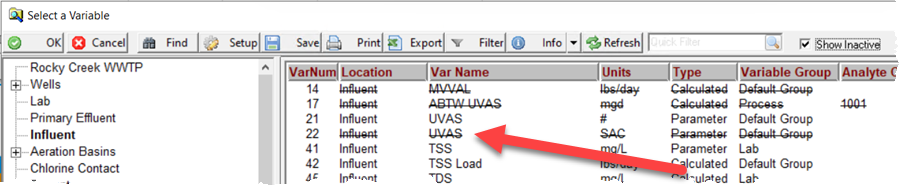
4. Future Due Lab Cal Samples will not show the Test/Variable. Does not affect any samples that are in progress or in history.
5. Reports/Graphs etc... are not affected.
NOTE FOR WIMS SYNC USERS: The IsActive Flag has the following values:
- Active - Variable is Active in WIMS and Rio and Data is synced. VARDESC.ISACTIVE=-1
- Inactive - Variable is Inactive in WIMS and Rio. Data will not be synced. Variables set to Inactive will not be created by the Configuration Conversion Utility. VARDESC.ISACTIVE=0
- Active, no sync - WIMS Sync will not sync any variable definition changes or data changes to Rio but keeps the variable Active in WIMS (in WIMS, Active, no sync is the same as Active). If the Rio Parameter already exists, setting to Active, no Sync turns off data flowing from WIMS to Rio AND from Rio to WIMS for that variable. This DOES NOT set the parameter to inactive in Rio. If set to Active, no sync when the Rio Configuration Conversion tool is run, this variable will not be selectable to be created in Rio. VARDESC.ISACTIVE=1
- Active, Rio Inactive - WIMS is active in WIMS and is marked as Inactive in Rio. Data will not be synced. Variables will not be created by the Configuration Conversion Utility. VARDESC.ISACTIVE=2