In Monthly Data Entry Design, users can specify an SQL Statement that sets the variables (and their order) for the form. This can be used to build "dynamic" forms.
Example #1: Form that has the field data collection variables that are due in Lab Cal Samples for the day.
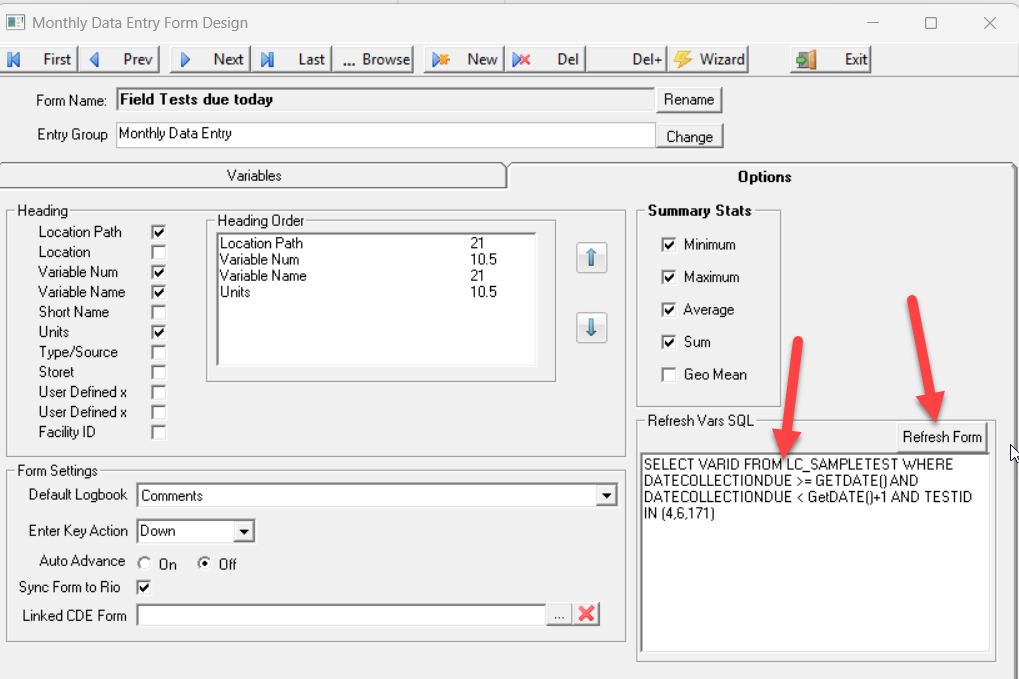
Set the SQL to SELECT VARID FROM LC_SAMPLETEST WHERE DATECOLLECTIONDUE >= GETDATE() AND DATECOLLECTIONDUE < GetDATE()+1 AND TESTID IN (4,6,171) where TESTID 4,6, and 171 are the field tests (i.e. pH, Temperature, and Free Chlorine Residual). This query will return the variables that are due today for those tests.
When Refresh Form is clicked, the form is updated for the variables returned in the query. NOTE: As of v8.5.0 the Refresh Form button must be pressed, however in an upcoming version you will be allowed to schedule the refresh as a task.