|
Rio Upload Utility will upload csv files to Rio. The files must be in the format of csv files that can be created and uploaded to Rio by Interfaces. See Rio Upload.
Utility Setup:
Source Information:
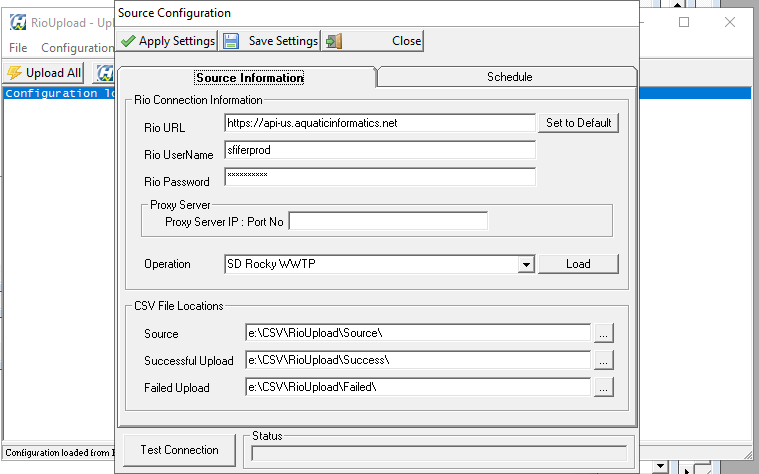
Rio Connection Information
- Rio URL
- URL for your Rio Operations
- Rio User
- Rio User that can access the operation you want to upload to
- Rio Password
- Password for the Rio User
- Proxy Server
- This is only needed if your environment utilizes a proxy server
- Operation
- Rio Operation or Plant to upload data to
- The Load button will load the dropdown with available Operations
- Test Connection will try to connect to Rio with the provided credentials
CSV File Locations
- Source
- Location of the CSV files to upload to Rio
- Successful Upload
- Directory that successfully uploaded CSV Files will be moved to
- Failed Upload
- Directory that files that failed to upload will be moved to
Schedule
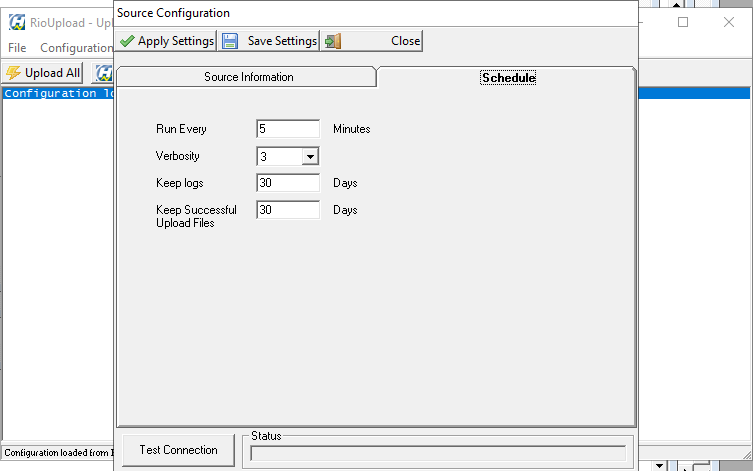
Schedule
Running Utility
-
Enter setup information
-
Interactively
-
Click on Upload All
-
File > Upload to Rio
-
As a Service
Utility Flow
-
The utility will try to upload all the files in the Source directory to Rio
-
All the files that were successfully uploaded will be moved to the Successful Upload directory
-
Files that failed to upload will be moved to the Failed Upload directory
-
Log files will be deleted based on the Keep Logs setting
|