Accessing the LabVantage source Database Management System can be accomplished using the Hach SQL_Console utility included with the Hach WIMS Client.
First you will need a connection string to the source data. The easiest way to accomplish this is to run the Q13415 interface, and select menu option Configuration -> Source Configuration. Once the Test Connection is successful and click Apply Settings, simply click on the View Applied Connection String.

Select Yes when prompted to view the password. Right click on the text box from the Connection String display and select Copy.

- Next, run the SQL_Console program found under the installation of the Hach WIMS Client, by default this would be "C:\HachWIMS\Client". Select the option OLEDB source. Right click in the text box and select Paste.

- When you click the Connect button, you will have a SQL Console to your source data. From here you can enter SQL commands to look at your data, such as
select w_data, w_stat, comments, sdatest, samplestatus, lsource, source, w_result, w_units from LABVANT.LIMSSAMPLESTATUSCOPY where samplestatus='W' and sdatest is not null and lsource is not null and source is not null and w_result is not null and last_updated >= TO_DATE('01-Jan-2002 12:00:00 AM', 'dd-Mon-yyyy HH:MI:SS AM') and last_updated <= TO_DATE('01-Jan-2003 12:00:00 AM', 'dd-Mon-yyyy HH:MI:SS AM') order by sdatest desc, lsource, source, w_result, last_updated desc

Sample Data:
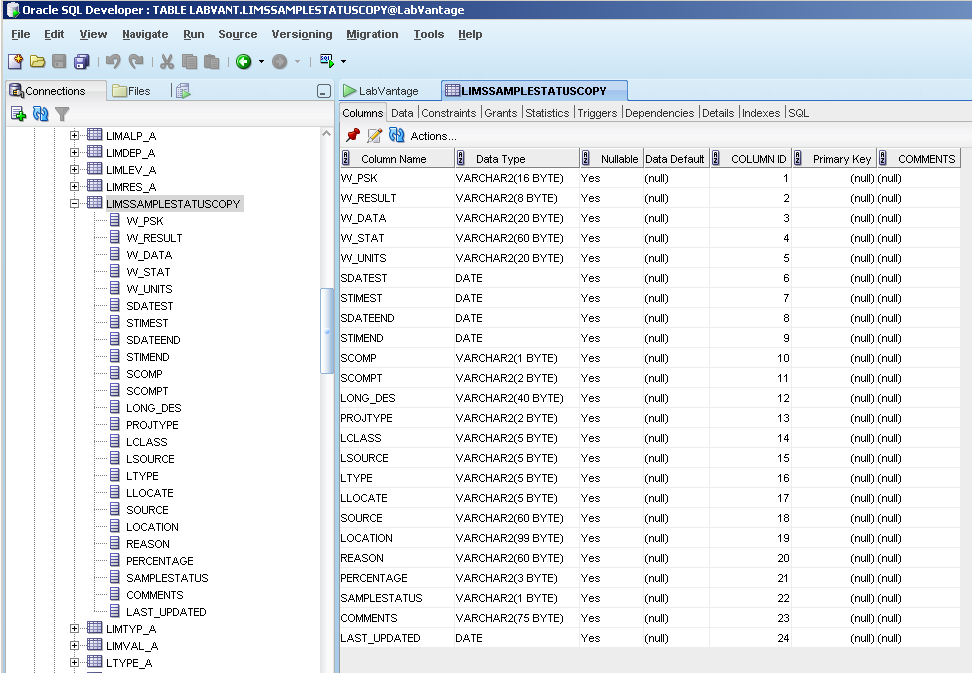
The following is some sample data used for testing the Custom Q13415 LabVantage LIMS Interface along with the database structure:
Database Definition:
Sample Data:
