The Recv from Entries button can update/create LabCal sample info (Sample Date/time, Sampled By, Sample Status) and test info (Analysis Date/Time complete, and Analyzed By) based on entered/imported results.
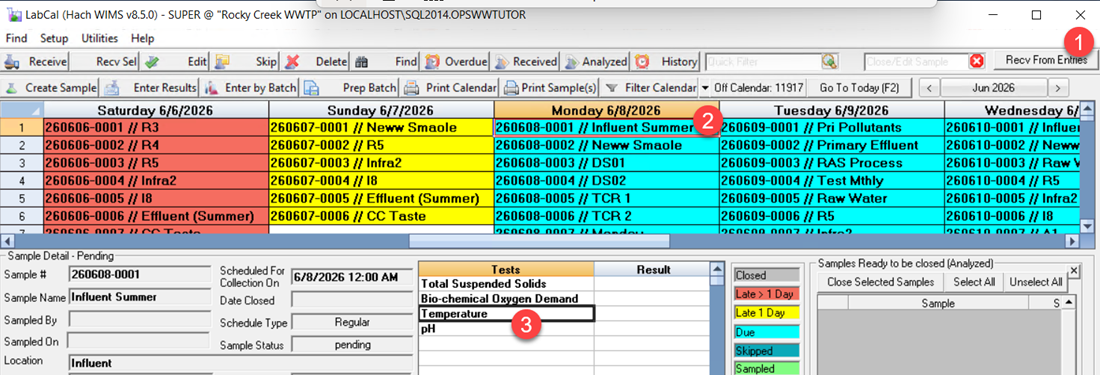
Setup:
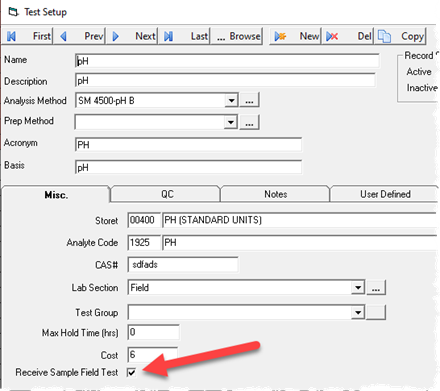
1. Receive of samples can only be triggered by results entered for field results. Therefore, the first step is to set your field tests that will be used to set receive. Go to Test Setup and check the Receive Sample Field Test:
2. Set your WIMS User Names in Personnel Setup. WIMS uses this to determine the sampler/analyst by reviewing the audituser.
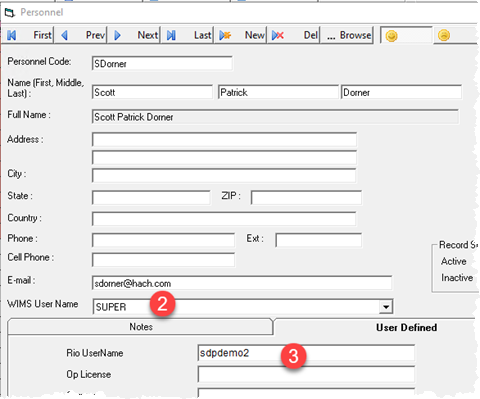
3. Set your Rio usernames in the Personnel Setup UD1 field (LC_PEOPLE.LC_PEOPLEUD1) if using Rio to enter the field data. WIMS sync sets the WIMS audituser to the Rio Username when syncing data from Rio and by setting this field it allows WIMS to determine the Sampler/Analyst. NOTE: The Rio Username field is stored in the LABCAL-RIOUNF facility setting (defaults to LC_PEOPLEUD1, the LC_PEOPLE.LC_PEOPLEUD1 field) and can be updated if LC_PEOPLEUD1 is in use.
Example #1: We have an Influent Summer sample where we collect the pH and Temperature when we take the sample. Using the Rio mobile app, Rio user 'sdpdemo2' enters the pH and Temperature at 6/8/2026 8:14 AM as they take the sample. That data is then synced with the audit user set to the Rio Username and the audit timestamp set to the time the data was entered into the mobile app.
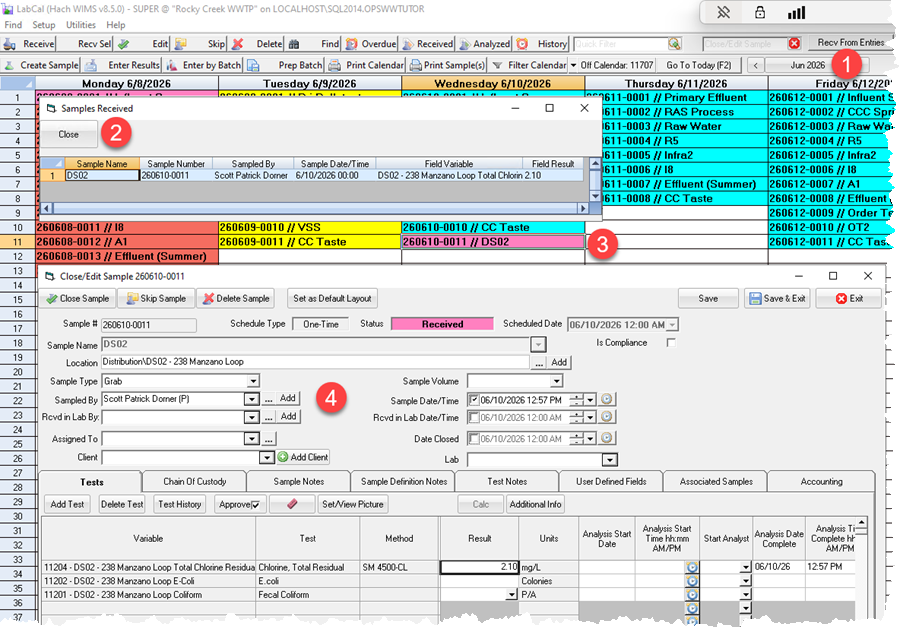
When the Recv from Entries button is clicked, any entries since the last time the button was clicked will be analyzed to see if they are part of a scheduled or defined sample. If they are and the sample has not yet marked as Received it will be marked as Received, sampled by the Audit user and assumed to be sampled at the time the field result was entered. The Samples Received window will display all samples received: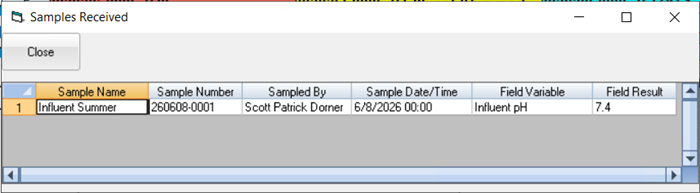
The Sample Date/time, Sampled By, Sample Status will only be set for samples that are pending (i.e. they have no Sample Date/Time). The Audituser is used to find the Personnel record to set Sampled By and Analyzed By. First, it will check the WIMS Username (ie audituser=LC_PEOPLE.USERNAME) and if no match is found will check if the Personnel UD1 field (audituser=LC_PEOPLE.LC_PEOPLEUD1) matches. Note: This is typically used to put the Rio username into UD1 as the Rio Username sets the Audituser field when data is synced from Rio. UD1 is the default, can be overridden with the "LABCAL-RIOUNF" facility setting.
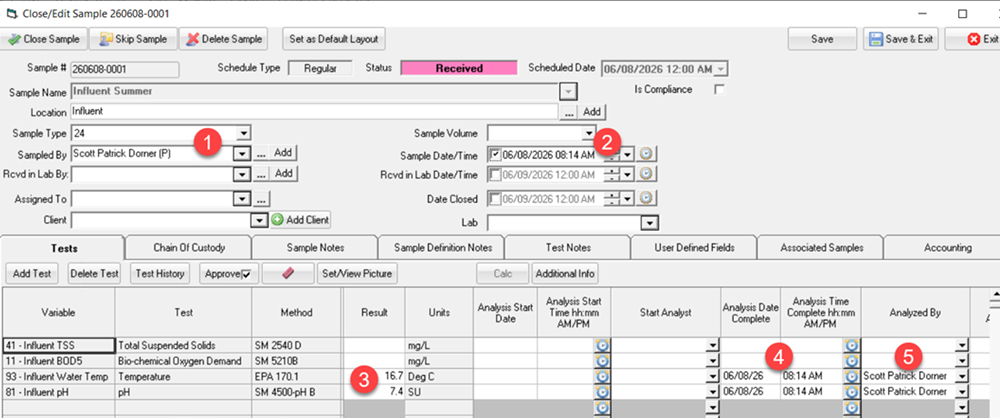
Variable 81 - Influent pH was updated since the last time the Recv From Entries was run. As it is part of the Influent Summer sample:
- Based on the Audituser of sdpdemo2, the Scott Dorner personnel record was found and is assumed to be the sampler.
- Based on the Audittimestamp of 6/8/2026 8:14 AM, the sample was assumed to be sampled at that time.
- Results set for the Variable/Test
- Analysis Date and Time updated based on Audittimestamp.
- Analyzed by updated based on audituser/personnel record.
Example #2: Create a non scheduled sample
The DS02 TCR sample is setup with no schedule. Total Chlorine Residual is marked as a "Receive Sample Field Test". User sdpdemo2 enters a Total Chlorine Residual of 2.1 at 6/10/2026 12:57 PM. Sample is created for 6/10/2026 and marked as Received:
Tech Notes:
- Samples will only be received when the audittimestamp is within the datestamp's slot (ie the same day for a daily var, same hour for an hourly var....). Example, I enter the Chlorine Residual (a daily variable) for 6/11/2026 at 6/12/2026 8:15AM, this record will be ignored for the purposes of receiving/creating samples. For the Receive from Entries to work properly, it is expected that data is entered in near real time to when the data is collected, i.e. I enter the Chlorine Residual in the system when I read the Chlorine Residual in the field.
- The last run date/time is stored in the LABCAL_AUTORCVLASTRUN facility setting in mmddyyyy hh:mm:ss format. If it is not set, it defaults to midnight of the current day (i.e. the start of the current day)
- The Rio Username field is stored in the LABCAL-RIOUNF facility setting (defaults to LC_PEOPLEUD1, the LC_PEOPLE.LC_PEOPLEUD1 field).
- Works with Daily, Hourly or 15 minute data.
- Query to get latest results:
SELECT VARDESC.VARID,VARTYPE,DateStamp,TEXTVALUE, Datatbl.AuditTimeStamp FROM DATATBL,VARDESC WHERE DATATBL.VARID=VARDESC.VARID AND DATATBL.AUDITTIMESTAMP > '2026-06-09 19:39:40' AND VARDESC.VARID IN(SELECT VARID FROM LC_SAMPLEDEFTEST, LC_TEST WHERE LC_SAMPLEDEFTEST.TESTID=LC_TEST.ID AND LC_TEST.RECVSAMPLE=-1)
Union
SELECT VARDESC.VARID,VARTYPE,DateStamp,TEXTVALUE, DataDDH.AuditTimeStamp FROM DATADDH,VARDESC WHERE DATADDH.VARID=VARDESC.VARID AND DATADDH.AUDITTIMESTAMP > '2026-06-09 19:39:40' AND VARDESC.VARID IN(SELECT VARID FROM LC_SAMPLEDEFTEST, LC_TEST WHERE LC_SAMPLEDEFTEST.TESTID=LC_TEST.ID AND LC_TEST.RECVSAMPLE=-1)
Union
SELECT VARDESC.VARID,VARTYPE,DateStamp,TEXTVALUE, DataDDF.AuditTimeStamp FROM DATADDF,VARDESC WHERE DATADDF.VARID=VARDESC.VARID AND DATADDF.AUDITTIMESTAMP > '2026-06-09 19:39:40' AND VARDESC.VARID IN(SELECT VARID FROM LC_SAMPLEDEFTEST, LC_TEST WHERE LC_SAMPLEDEFTEST.TESTID=LC_TEST.ID AND LC_TEST.RECVSAMPLE=-1)