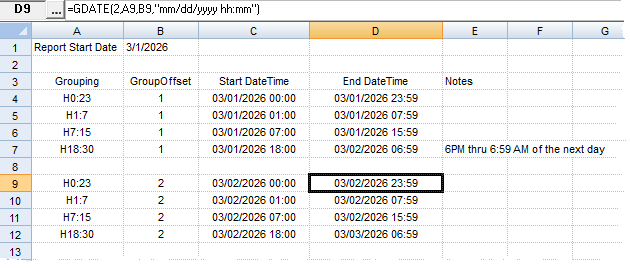
When using Spread Grouping functions (GAVG, GMAX, GFIRSTZ...) you can group the data by partial days. This allows you to summarize daily detail variables (hourly, 15 minute, etc...) by shift or off peak hours.
The grouping syntax for partial days is "Hstarthour:stophour".
starthour: Is zero based and sets which hour the summary should be started on.
stophour: Is zero based and sets which hour the summary should be ending on. Note summary goes to the end of this hour.
H0:23 - From midnight thru 23:59.
H7:15 - From 7AM thru 15:59 (3:59 PM)
H18:30 - From 18:00 thru 06:59 of the next day (i.e. night shift)
The groupoffset sets which day to perform the summary for, 1 is the first day of the report, 2 the second, etc..