Q15002 CSV to SQL Utility loads CSV files to a SQL Server table. This allows Q12160 Narrow Format Ole Db interface to import data more efficiently then the CSV interface.
Setup:
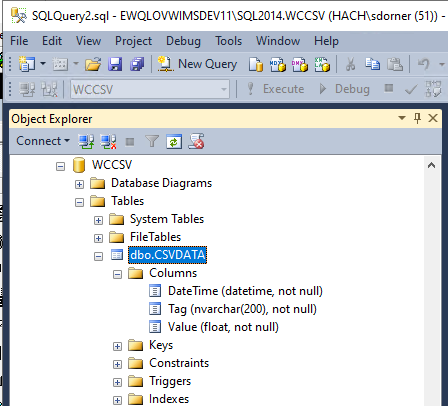
1. Create a Destination Table in SQL server. The table must contain a DateTime, Tag, and Value column. Table can be named anything but the columns MUST be named DateTime, Tag, and Value. In this example, we created CSVDATA in the WCCSV database:
2. Run Q15002.exe and configure the Utility.
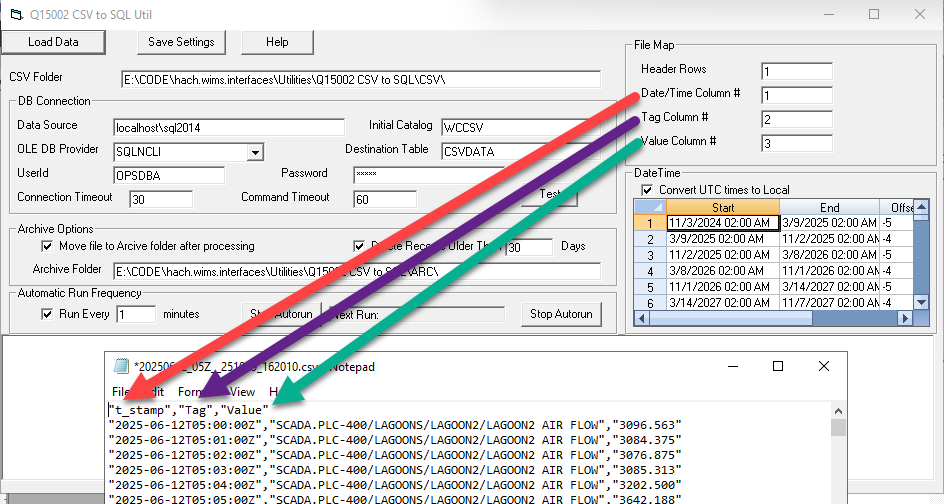
a.Map your source CSV files setting the Header rows and position of the columns in the file.
b. CSV Folder - Location of the source CSV files.
c. DB Connection - Set your Data Source, Initial Catalog (database), OLE DB Provider, Destination Table, UserID and Password to connect to the SQL instance.
d. Archive Options - Set the Archive Folder to move the CSV files after processing. Set the Delete Records Older than xxx days, this will delete records from the Destination Table older than the number of days specified keeping the table from growing.
e.Set the Run Every x Minutes. Sets how often the utility checks the CSV folder for files.
f. If your source csv files contain dates in UTC, enter start and end date times to adjust the UTC times to local time when storing in the SQL Table.
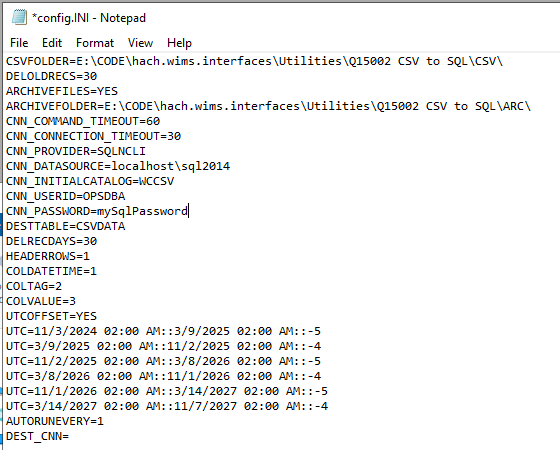
Click Save Settings. This updates the Config.ini file.
Running the Utility
Option 1 - Autorun
The Utility can be left running by clicking the Start Autorun button. The Utility will remain in memory and will continue to wake up every x minutes and load the data to the SQL Table.
Option 2 - Command Line
Using Scheduled tasks, the Utility can be launched with a command line option of "1". This will run the utility, load the data from the CSV files to SQL and shutdown the utility.
Release Notes:
V1.0.1 released 3/17/2026
- Improved logging to create one log file per day when in Autorun mode.